maquette Start a board

maquette

Spread them out. Find the sequence.

A shared light table for your photographs, live with your editor. Then bind the edit as a book, publish it as a site, hang it in a room.

Start a board No account for your first board.
Products

One edit, four ways to show it.

The board is where the work happens. The same photographs, in the same order, bind into a book, go online as a site and hang in a room. Nothing is copied or exported in between.

Solutions

For the people around a photograph.

A photograph rarely gets made alone. Pick the page that sounds like your week: the same tools, in the order you'd use them.

Every feature, in the order you'll need it

From the card to the book.

Six steps, one place. Everything on this page works today.

  1. 01Collect
  2. 02Curate
  3. 03Discuss
  4. 04Book
  5. 05Site
  6. 06Show
01 · Collect

Bring in the whole shoot.

Drop a folder, paste from anywhere or pick files. Every photo and every board stays in your library.

  • Drop, paste or pick. ⌘V pastes onto the table. Photos up to 50 MB upload four at a time, with progress and retry; drop a whole folder and it lays out in the order the photos were taken.
  • PDFs beside the photos. Contact sheets, layouts and readings sit on the table and scale like prints.
  • Location removed. GPS and place names leave the file before it uploads, in place, without re-encoding.
  • No account to start. A guest board holds 4 photos for 7 days. Sign in and it's yours to keep.
  • One library. The Photos tab lists everything you've uploaded, across boards.
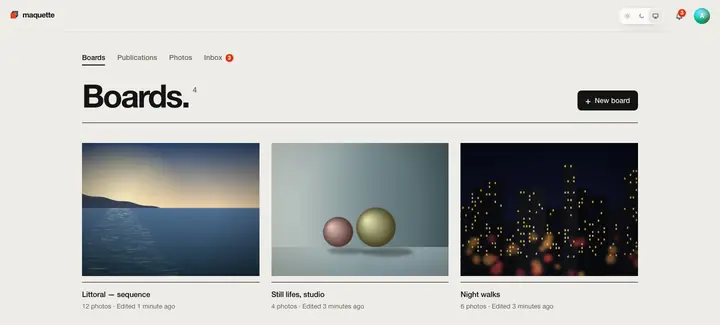
The dashboard: tabs for Boards, Publications, Photos and Inbox, and three boards with their cover photographs.
Dashboard · boards, publications, photos, inbox
02 · Curate

Find the sequence.

An infinite table where reading order is the order: left to right, row by row. Everything downstream follows it.

  • Sections. Draw a titled frame around a group (F), or wrap the selection (⌘G). Drag the title and everything inside moves with it.
  • Reading order is the sequence. Section by section, then left to right, row by row. The loupe, the ZIP, the exhibit and new books all follow it.
  • Rate, flag, label. 0–5 stars, pick or reject, colour labels, with the keys you know from Lightroom. Everyone keeps their own marks; filter by yours or someone else's.
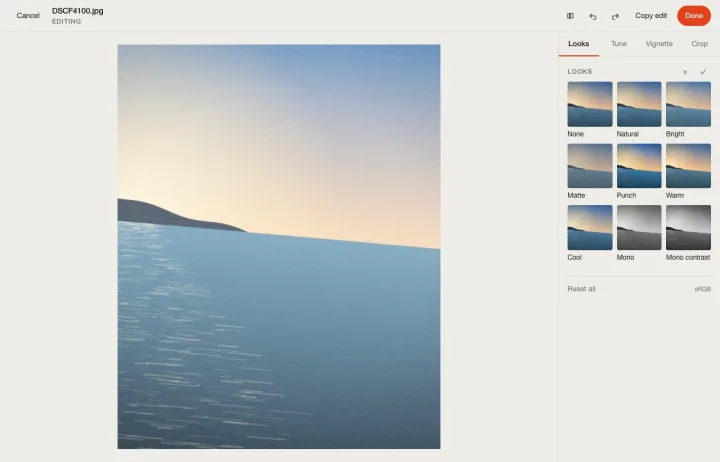
  • Edit the photo, not the file. Tune, looks, vignette, crop and straighten in the loupe. The original is never touched; copy an edit and paste it onto a whole selection.
  • A loupe with EXIF. Space opens a photo full screen with lens, focal length, aperture, shutter and ISO.
  • Undo is yours. ⌘Z takes back your own changes, never a collaborator's.
A board titled Littoral, working sequence, v3: twelve photographs of sea, still lifes and night streets in four columns, Bea's cursor among them.
Board · Ana and Bea, live
The editor: a coastline at dusk with a row of looks below it and the Tune, Looks, Vignette and Crop tools.
Edit · looks, tune, crop, paste onto many
03 · Discuss

Everyone at the same table.

Send a link and your editor is there: their cursor, their moves, as they happen. Notes go exactly where you mean them.

  • Live cursors and presence. See who's here and where they point. Someone who looks away stays, dimmed.
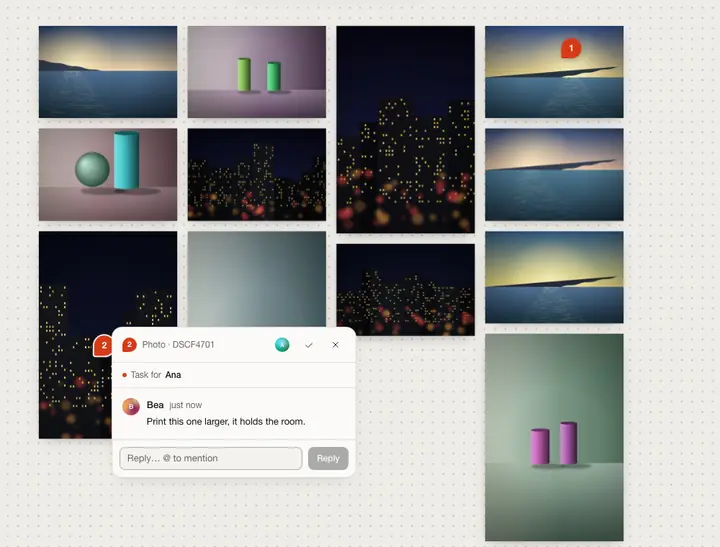
  • Notes on the exact pixel. Pin a comment to a point on a photo, the table or a wall in the exhibit. Pins stay put when the photo moves.
  • Mention, assign, resolve. @someone, make it their task, resolve it, reopen it with a reply.
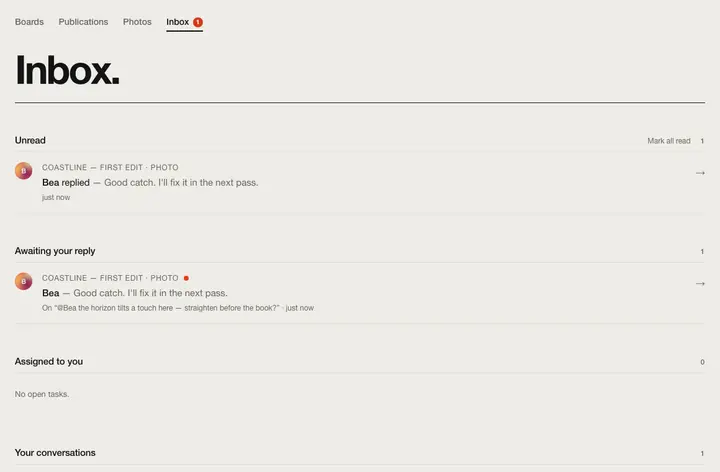
  • An inbox that knows. What's assigned to you, waiting for your reply or unread, across boards. Mentions and tasks arrive by email too, linked to the pin.
A comment thread pinned to a night photograph: a task for Ana from Bea reading: Print this one larger, it holds the room.
Comment pinned to a photo, assigned as a task
The inbox: unread replies, conversations awaiting your reply and tasks assigned to you.
Inbox · unread, awaiting your reply, assigned to you
04 · Book

Then the book.

Make a book from a board and it starts laid out: one photo per page, in your order, with your edits. Edit it together, spread by spread, then send it to the printer.

  • A first layout that thinks. Each photo gets a full bleed or a captioned page, by orientation, crop and resolution.
  • Choose what the page shows. Drag a full-bleed photo inside its frame to pick the part that shows, and zoom to crop in; the print check follows the zoom.
  • Layouts, covers, an index. Six layouts or free placement with snapping; covers in colour, linen or your artwork; an index of sections and plates that writes itself.
  • Read it in 3D. Turn the pages, turn it over, try trim, paper and cover live. On a phone it turns one page at a time.
  • Print-ready PDF. The interior with 3 mm bleed and optional crop marks, a one-piece cover with its spine; softcover, hardcover or saddle stitch. A preflight warns below 300 ppi.
  • Share a book. Invite by email, or send a short secret reading link you can reset.
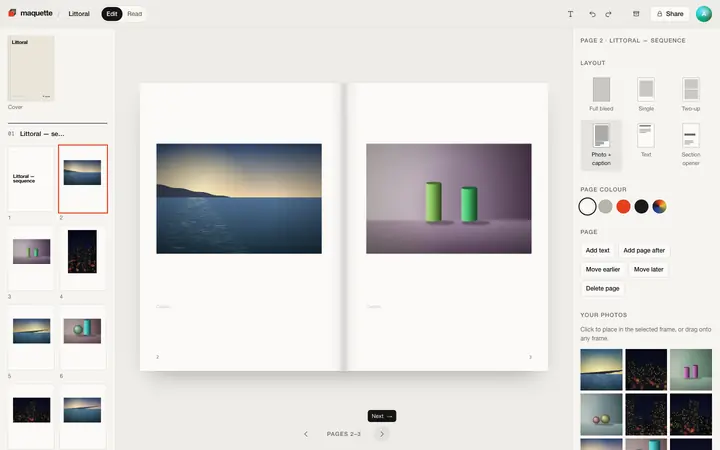
The book editor: the page list on the left, an open spread of two coastline photographs, and layouts on the right.
Book editor
Open the sample book in the 3D reader
Reader · open the sample book
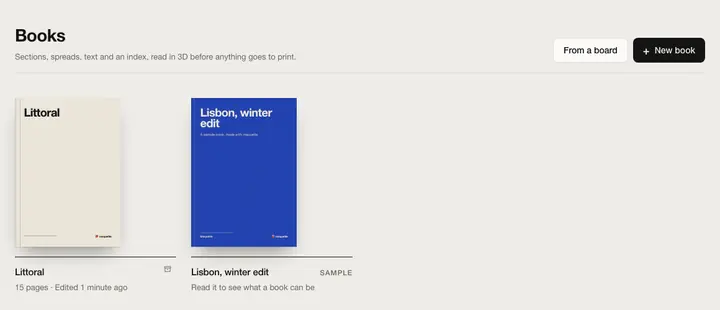
The publications shelf: a book made from a board next to the sample book.
Publications · your shelf
05 · Site

And the site.

Publish your boards as a portfolio: each board a project, in a template, or on a home you compose yourself. You edit it where it will be read, and nothing goes online until you publish.

  • Five templates. Index, Essay, Plates, Contact sheet and Dossier, one long page with a full-bleed photograph, your about, projects and dated lists. Switch without losing anything, and show each project vertically or as a carousel.
  • A home from sections. A cover with your name over it, groups of projects as switches, a grid or a list, text and dated lists, in the order you choose.
  • Edit on the page. Click a block in the preview, double-click text to type, drag photos and text into a new order.
  • Text that reads well. About and contact pages, a menu, links to elsewhere, and text with bold, italic, links and lists, set in a serif.
  • Captions that say enough. Title, place, year, medium, edition and size under each photo, and alt text for people who can't see it.
  • Quiet by default. No scripts on your pages, hidden from search engines until you choose, every version kept to put back online.
The site editor: the home's sections on the left (a hero, text, projects as switches), the live preview, and the five templates on the right.
Site editor · sections, live preview, templates
06 · Show

See the show before you print it.

Share the board with exactly who should see it. One click hangs the same sequence in a room you can walk through together.

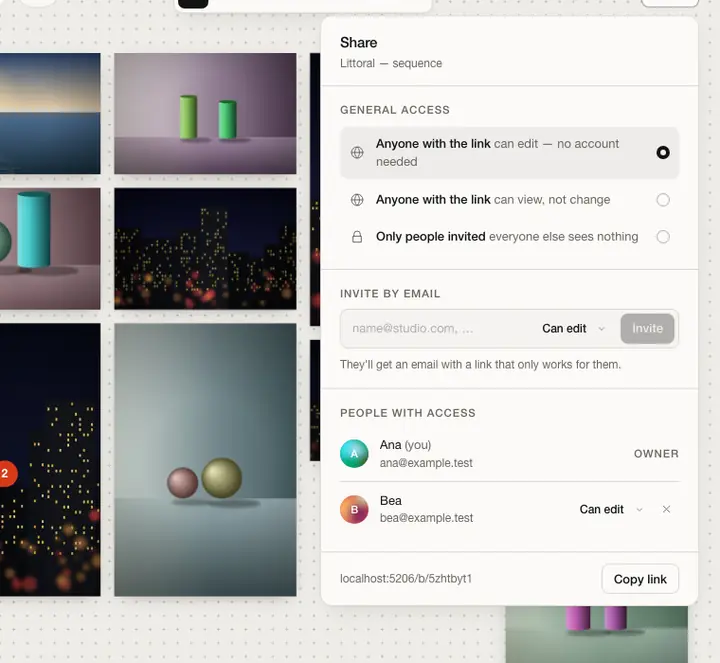
  • Three kinds of access. Only people invited, anyone with the link can view, or anyone with the link can edit.
  • Invites and roles. Email invites work for that address only. Owners, editors and viewers; viewers watch live and change nothing.
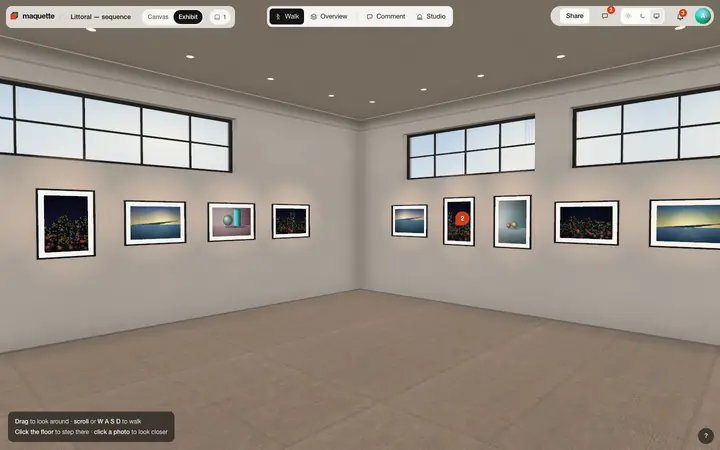
  • A room for the sequence. Photos hang along the walls in reading order; take one down and it waits in a tray.
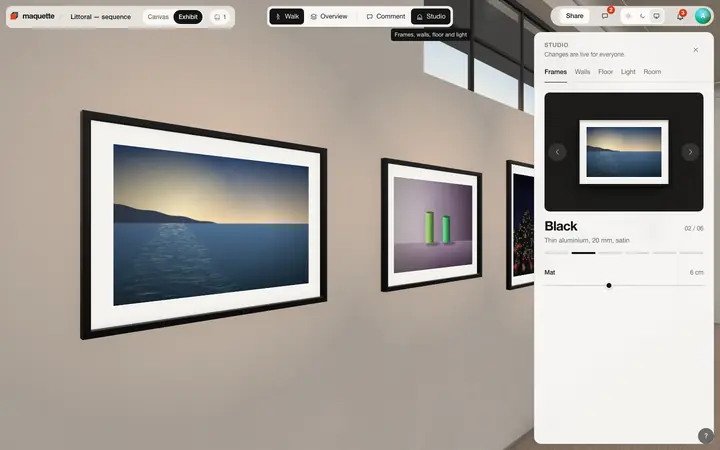
  • The studio. Frames and mats per photo or for the room, wall colour and finish, floors, ceilings, windows, light.
  • Walk it together. Scroll or WASD to walk, an overview from above, and everyone else as a figure in their colour.
  • Take everything with you. Download the board as a ZIP: originals numbered in reading order.
Walking the exhibit: framed photographs along two walls, clerestory windows above, a concrete floor.
Exhibit · walking the room
The studio panel over the room: frame choice Black, thin aluminium, with a mat slider.
Studio · frames, walls, floor, light
The share dialog: general access options, invite by email, and the people with access with their roles.
Share · access, invites, roles
Privacy and access

Your work, your call.

Who sees work in progress, and what a file gives away, should be decided by you. This is what maquette does today.

DSCF4412.jpgbefore it leaves your browser
  • GPS positionremoved
  • Place namesremoved
  • The photographkept as it is

Where a photo was taken is removed in your browser before upload, and the server removes it again from JPEGs.

  1. Private until you share.Boards you create while signed in are private until you share them, and books start private too.
  2. You choose who.Decide who can view and who can edit.
  3. Viewers can't change anything.That's enforced on the server, not just by hiding buttons.
  4. Location stays with you.GPS and place names are removed before a photo leaves your browser, and again on the server for JPEGs.
  5. No advertising or analytics cookies.We don't use them.
  6. No password to leak.You sign in with a one-time email code or a passkey.
  7. Guest boards don't linger.Boards made without an account are deleted with their photos after 7 days without edits.
  8. Your originals, any time.Download any board as a ZIP of your originals.
  9. Everything about you, in one file.Settings → Your data downloads your account, boards, uploads, comments, books, sites and activity as a ZIP.
  10. Leave whenever you like.Delete your account from Settings. What you own alone goes; comments on other people's boards stay as “Deleted user”.
Questions

Before you start.

Grouped by what people usually ask first. Every answer is how the product works today.

01–04Sharing & privacy

01Do the people I share with need an account?

Not to look. A board shared as “anyone with the link can view” opens in any browser, on a phone too. Guest boards can even be edited without an account. Comments and tasks need a sign-in, so everyone knows who said what.

02Who can see my board?

You choose: only people you invite, anyone with the link can view, or anyone with the link can edit. Boards you create while signed in are private until you share them, and books start private too.

03What happens to the location in my photos?

It's removed from the file in your browser before upload, and removed again on the server for JPEGs. Camera, lens, exposure and capture date stay.

04Can I get my work out again?

Yes. Download any board as a ZIP: your originals, numbered in reading order, with a file describing the layout, or with your edits applied. Settings → Your data downloads everything stored about you in one ZIP.

05–07Books & print

05Can I print the book?

Yes. Export a print-ready PDF: the interior with 3 mm bleed and optional crop marks, and a one-piece cover with its spine worked out from the paper and page count, for softcover, hardcover or saddle stitch. The files are RGB; ask your printer what they need.

Want to see one? Download the sample book as a PDF.

06What if a photo isn't sharp enough for print?

The preflight checks every photo at its printed size: it warns below 300 ppi and stops the print file below 150. It also checks the safe zone and the page count.

07Can someone read the book without editing it?

Yes. Invite them by email with a role, or switch on a secret reading link that opens the book read-only in the 3D reader. Reset the link, or turn it off, whenever you like.

08–09Sites

08What does a site look like?

Your boards as projects, in one of five templates: Index, Essay, Plates, Contact sheet or Dossier. Or build the home yourself from sections: a cover, groups of projects, text and dated lists. Add About and contact pages and a menu, show a project vertically or as a carousel, and tune margins, width, palette and captions. Pages have no scripts and images are sized for every screen.

09Can I undo a publish?

Every publish is a version. Put an earlier one back online, or unpublish, from the editor; drafts are never public.

10–11Cost

10Does it cost anything to look?

No. The people you share a board, book or site with never pay and never need an account to look. Starting a board doesn't need one either.

11What does maquette cost?

Nothing during the beta. We expect to add paid plans for people who make a lot (more storage, print files, more sites) while looking, commenting and a free plan stay free. See the plans we're considering.

12–14Technical

12What can I upload?

Images your browser can read (JPEG, PNG, WebP and others) up to 50 MB each, and PDFs up to 15 MB. Thumbnails are made for the table; the original is kept as you uploaded it, minus its location.

13Does it work on a phone?

Yes. The people you share with can pinch to zoom, tap a photo to open it, swipe through the loupe, and read a book one page at a time. You can work on a board from a phone too, with one bar of tools at the bottom; a big layout is still easier on a bigger screen.

14Where is my work stored?

On Cloudflare: photos in R2, boards and books in Durable Objects, accounts in D1.

Start the edit.

Start a board No account needed. A guest board holds 4 photos for 7 days; sign in and it's yours to keep. Or leaf through a sample book